
Outlook.com Rejected Mail With No DMARC Record
For one weekend in November, a domain could pass SPF and DKIM and still bounce at Outlook.com, because it had no DMARC record at all. The filter started on Friday, November 6, 2026, and Microsoft rolled it back on Monday, November 9. It was not limited to high-volume senders, and it did not hit Microsoft 365. If you are about to send again after a quiet stretch, that weekend is the reason to publish DMARC before you touch the template.
Al Iverson documented the bounce on Spam Resource. The SMTP response was 550 5.7.1 Message rejected: Message lacks SPF/DKIM/DMARC Auth Records. He removed DMARC from non-bulk personal domains on Saturday, November 7, and mail to outlook.com was rejected. Mail to a Microsoft 365 corporate domain was accepted in the same test. Other operators called the failures sporadic rather than universal. Treat the dates and the scope as reported, not as a permanent new rule.
This was not the bulk-sender rule you already know
Microsoft's published requirement is narrower. Outlook.com's postmaster policies say that from May 5, 2025, domains sending more than 5,000 messages a day to Outlook.com must pass SPF and DKIM and publish DMARC. Mail that fails can go to junk, and unresolved failures can be rejected with 550 5.7.515. Below that volume, the same page still recommends SPF, DKIM, and DMARC. It does not say a missing DMARC record alone will hard-bounce every message.
The November incident used a different code, 5.7.1, and it reached senders under the 5,000-a-day line. Spam Resource's reading is that Microsoft rolled the change back, and that the spike looks unintentional. A rollback is not a promise. The useful reading is the one Iverson gives: if a domain sends mail, it should have a DMARC record, even when you are not a bulk sender. A record at p=none would have kept this particular bounce from happening. It would not have stopped spoofing. For that, you still have to move to enforcement on purpose. Our walkthrough from p=none to p=reject is the safe version of that second step, and the SPF, DKIM, and DMARC explainer covers what each record actually checks.
Spamhaus just published the same expectation
On October 21, 2026, Spamhaus put its sender guidelines in one public document. The minimum list is concrete: confirmed opt-in, forward-confirmed reverse DNS on every sending IP, a HELO hostname that resolves back to that IP, and SPF, DKIM, and DMARC, with the DKIM domain aligned to the visible From address. Starting in November 2026, Spamhaus says it is gradually requiring a valid HELO, a PTR record, and a matching A record for every sending IP. A listing there is not a junk-folder problem. Apple, Microsoft, Yahoo, and a long list of filters still refuse mail that Spamhaus lists.
That is the same week-shaped advice as the Outlook.com bounce, from the blocklist side. Authentication without permission still fails. Confirmed opt-in is requirement one in the Spamhaus document because purchased and stale addresses are how senders hit spam traps. If your ESP sends the mail, ask them whether the signing domain, the envelope domain, and the From domain are the ones in your DNS, not an unmarked shared domain you have never published DMARC for.
Restart the newsletter only after the domain is ready
Simon Harper's All About Email #263, on November 2, is about a newsletter that stopped because building the email was miserable. His first instruction is not a new editor. It is to authenticate the sending domain, ideally on a subdomain, before any workflow shortcut, especially after a long silence. A faster production process does not help if the comeback issue bounces.
Issue #264, on November 9, is the other half. The sender has been thinking about the return. The subscriber has not. Before a restart, Harper wants four answers: how those people subscribed, when they last heard from you, whether bounces and complaints stayed suppressed, and whether the newsletter is still what they asked for. He also warns against assuming a "do you still want this?" blast inside the ESP is a safe first step. Mailchimp's own stale-address guidance, which he points to, says to remove stale addresses and reconfirm them outside the platform.
Put the two issues next to the Outlook.com weekend and the order is obvious. Publish DMARC and confirm the domain still authenticates. Suppress old bounces and complaints. Then send a short note to people who can still be expected to want it, with a real reason to read and an obvious way out. A full-list apology to every address from two years ago is how a comeback becomes a complaint spike.
Then look at the email in classic Outlook
A domain that authenticates can still ship a template that falls apart for the people who open it. Jay Oram's October 23 ActionRocket guide is a reminder that the 1px white line in classic Outlook is still a 2026 problem. New Outlook for Windows, the default for most users from April 2026, does not use Word to render HTML. Classic Outlook does, and Microsoft is supporting that engine until at least 2029 for Microsoft 365 and perpetual-license customers. If a meaningful share of your audience is still there, the bug is still yours.
Oram's prevention list is short enough to put in a design system:
- Keep font-size, line-height, padding, margin, and image dimensions divisible by 4. At 96 DPI, 1px is 0.75pt, so a value that is not divisible by 4 can leave a fraction of a point and a hairline gap.
- Keep each module in its own short table. Long stacks make the rounding harder to find.
- Set images to
display: block, and setborder="0". A line break after an inline image is a gap. - For retina images, make both the full size and the displayed size divisible by 4. A 205px asset shown at half size is 102.5px.
The same HTML can show the line in one test and not the next, because Windows DPI, text zoom, and window size all change the math. That is why a single desktop screenshot is not a sign-off. Our notes on why Outlook breaks HTML email explain the Word engine underneath these gaps, and the pre-send testing guide is where this check belongs in the campaign, not after a stakeholder has already approved the file.
What to do before the next send
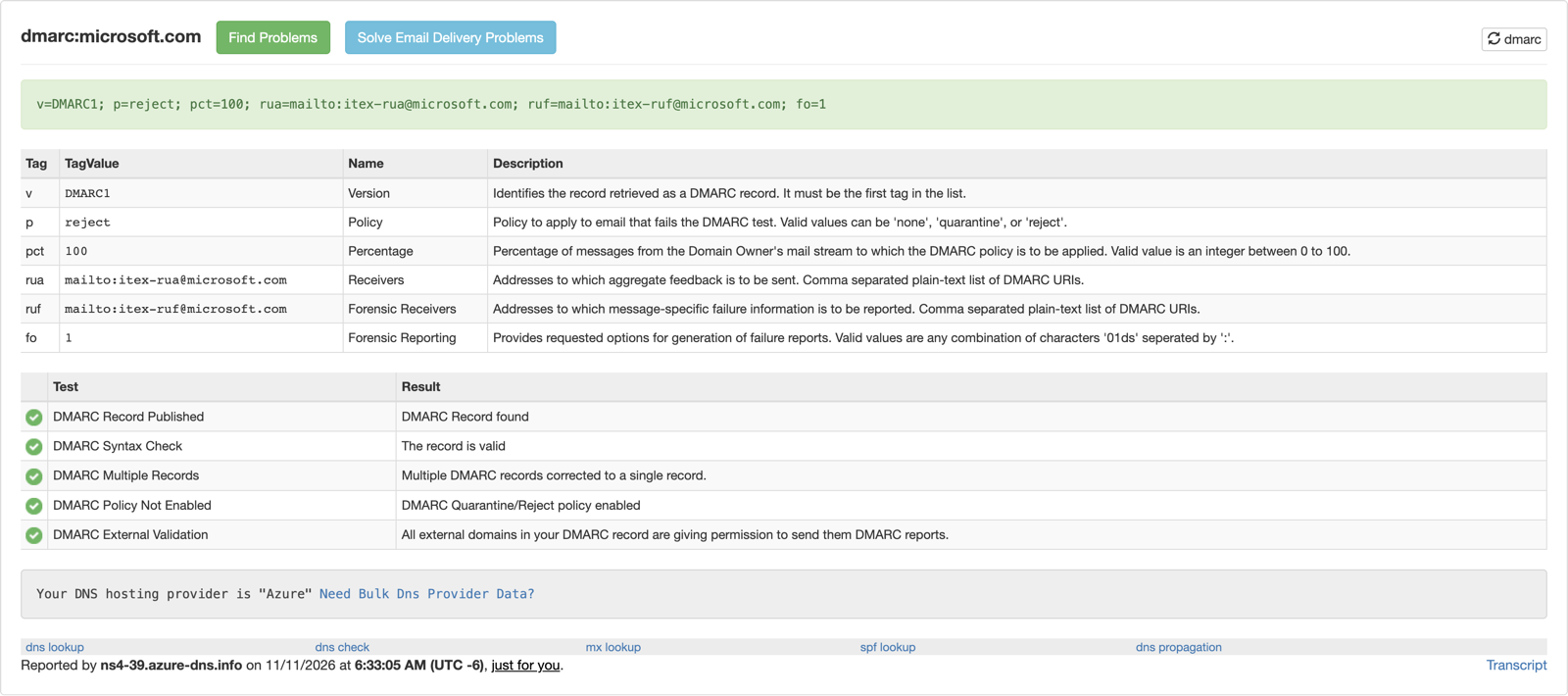
v=DMARC1; p=reject. A domain with no _dmarc record at all is what Outlook.com rejected on November 6–9. Start at p=none unless you have already read the reports. Image: MxToolbox DMARC lookup for microsoft.com, 11 November 2026.- Look up
_dmarc.yourdomain.com. If there is no TXT record, publishv=DMARC1; p=none; rua=mailto:dmarc@yourdomain.comon the domain that appears in the From address. Use a mailbox that can receive the reports. - Confirm SPF passes and that DKIM is signed and aligned with that same From domain. A DMARC record with no aligned pass does not satisfy Microsoft's bulk rule, and it will not help you later at
p=quarantine. - If you send under 5,000 messages a day, do this anyway. The November bounce did not wait for the bulk threshold.
- If the list has been quiet, suppress bounces and complaints, and do not mail every old address in the first send back.
- Preview the HTML in classic Outlook on Windows as well as the new Outlook, Gmail, and Apple Mail. Check a zoomed window, not only 100 percent.
When the records are in DNS, open the message the way a subscriber will see it. Postdrop renders the same HTML across inbox clients before that first send goes to a list you just decided to trust again. Authentication gets the message accepted. The preview tells you whether the comeback is worth opening.
References: Spam Resource on the November 6–9 rejections, Outlook.com postmaster policies, Spamhaus Sender Guidelines, All About Email #263, All About Email #264, and ActionRocket's 2026 Outlook white-line guide. Internal: the 2026 deliverability rules, moving DMARC from p=none to p=reject, and how to test HTML emails before sending.